Disclaimer: NOT FINANCIAL NOR INVESTMENT ADVICE. Only you are responsible for any capital-related decisions you make, and only you are accountable for the results.
Save 23% ($351) & Get a Free 1-1 Call with our Team ⏰ : 0d 2h 59m 43s
Guide
Tutorial: How to Use Phantom Wallet (Visual Guide)
For any Solana meme coin enthusiast, Phantom Wallet is the go to option. But many new commers don't know how to use it. But that's where we come in. Learn how to use Phantom Wallet and explore its powerful features, from staking tokens to swapping assets. In this guide, we’ll walk you through everything you need to know. Let’s get started.
Here are the aspects of Phantom Wallet we'll cover today,
- What is a Phantom
- Quick step-by-step flow chart
- Getting set up
- Depositing tokens
- Adding token support
- Sending tokens
- Swapping tokens
- Staking tokens
- Connecting to decentralised apps through Phantom
What is a Phantom?
Phantom is a cryptocurrency wallet that allows users to receive, store, send, swap, and stake tokens on the Solana blockchain. Phantom also enables access to a range of Solana-based decentralised applications (dapps), including decentralised exchanges, NFT projects, games, and social media platforms.When Phantom started off, it only catered to Solana, but as it grew, it started to incorporate other blockchains like Ethereum, Bitcoin, Polygon. In this tutorial, we’ll show you how to set up the wallet, deposit, swap, and stake tokens, as well as how to connect your Phantom wallet to dapps.
Quick Step-by-Step Flow Chart
For those looking for a quick overview, here’s a step-by-step flow chart that outlines the entire process at a glance. Refer to this chart if you want a visual guide to follow alongside the detailed steps below.

Click Here for the Full High-Resolution Flow Chart
Getting set up
Phantom is available to download as an iOS mobile app or browser extension. For this tutorial, we'll be sticking to the browser extension, but both versions function quite similarly.Start by heading over to Phantom's website, ‘Phantom.app’ and clicking the download button on the website’s homepage.

Next, you’ll have to select which browser you want to add your Phantom wallet to. For this tutorial, we’ll be using Chrome.
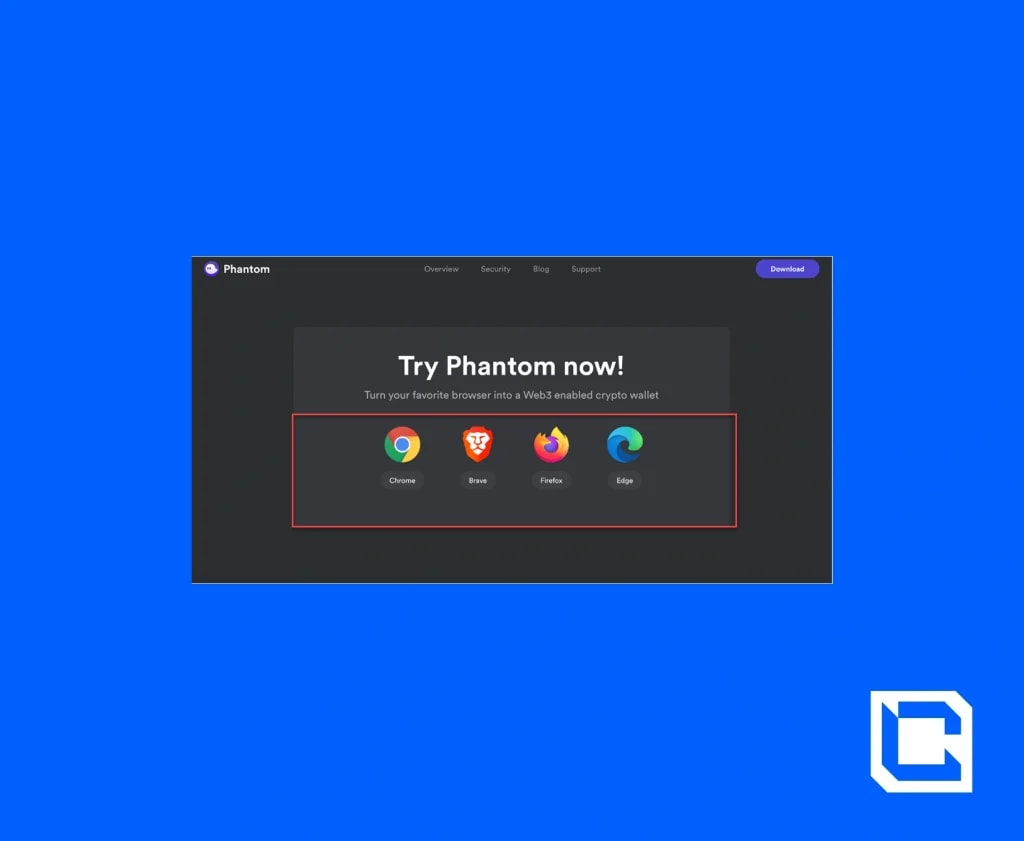
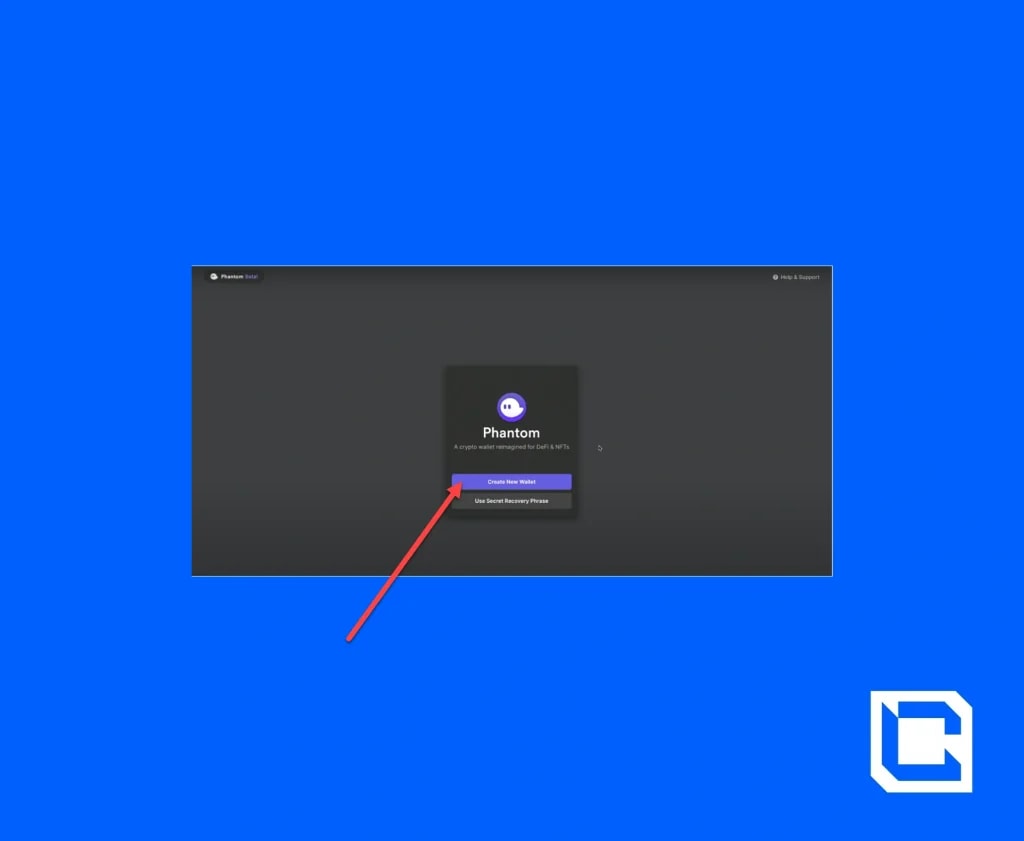
Once you click ‘add to Chrome’ followed by ‘add extension,’ Phantom will begin to download. After this, you’ll need to set up your actual Phantom wallet. If you already have one, then you can enter your secret recovery phrase to gain access. If not, click ‘create new wallet’.
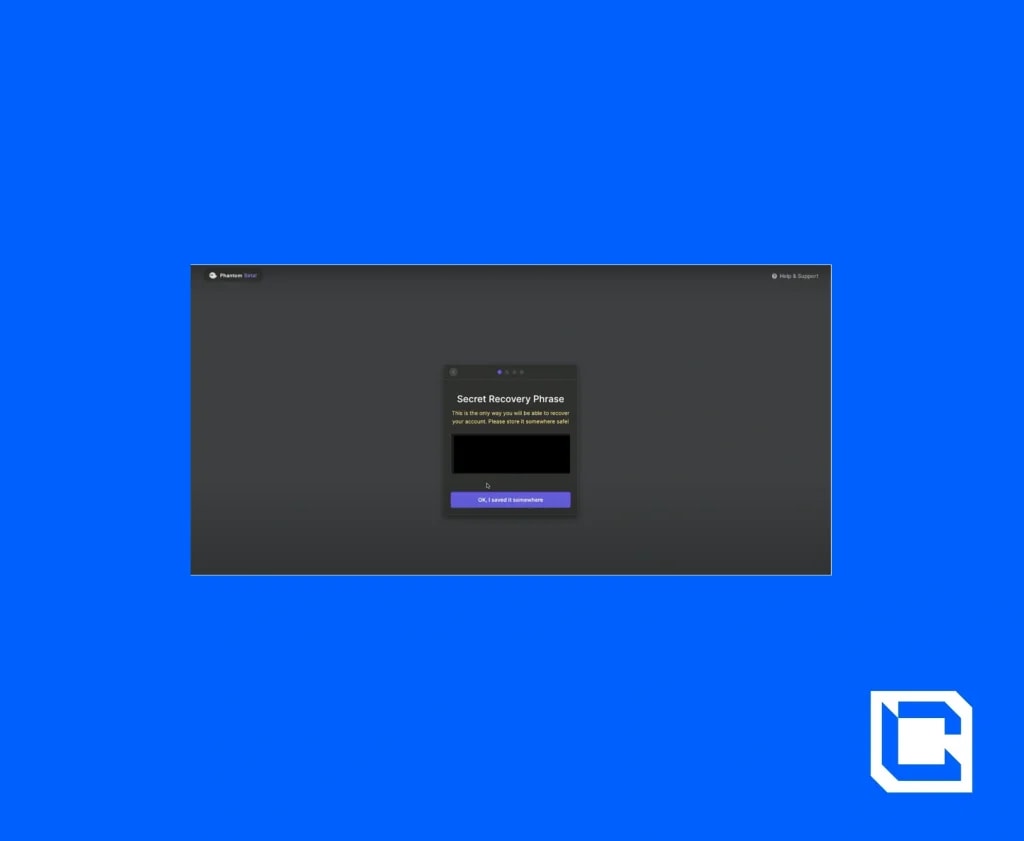
On the following page, you’ll be given your secret recovery phrase. If you ever lose access to your wallet, this phrase will enable you to log into Phantom from another device. It’s important that you write this phrase down and store it in a secure place.
Once you have this done, you’ll be asked to create a password for your account and to agree to Phantom’s terms and conditions. By clicking on'save’ followed by 'finish', your wallet will have been set up.
To pin the Phantom extension to your Chrome browser, all you have to do is click on the jigsaw icon on the top right of your browser and then press the pin icon displayed next to the Phantom icon.
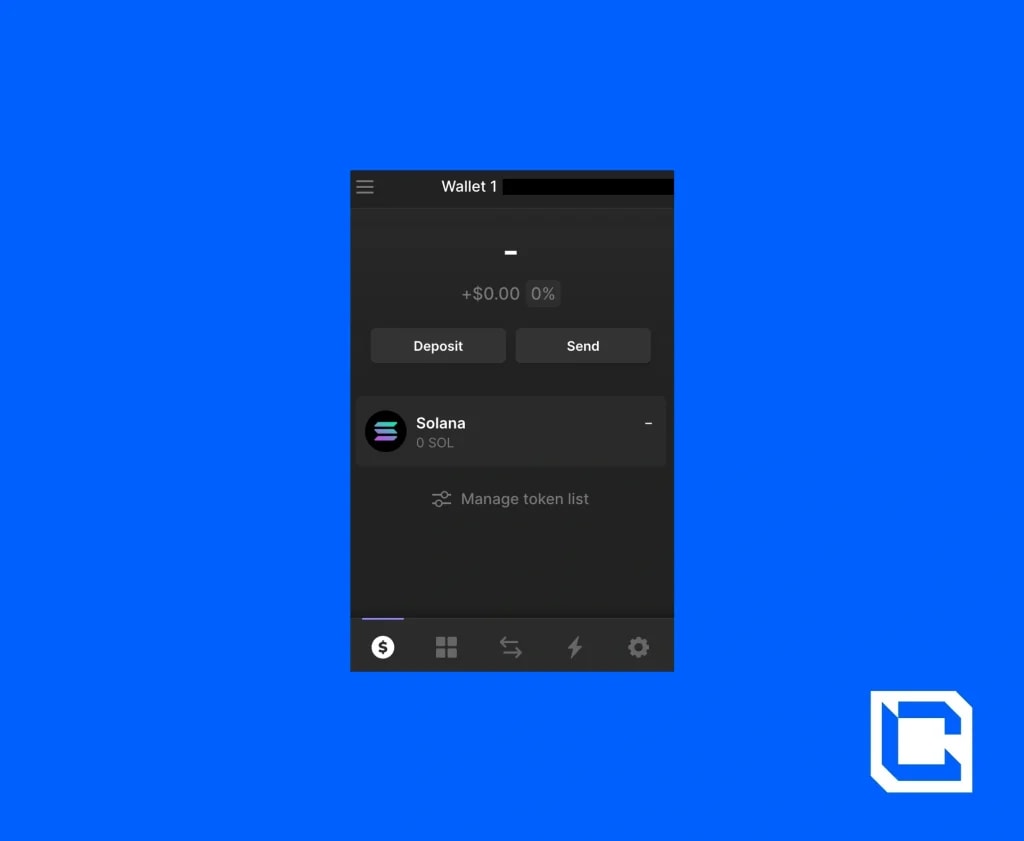
When you press on this icon, your Phantom wallet will pop up. Currently, there isn’t the option to view your wallet in full screen.

If you want to save addresses (i.e., any exchange accounts you might have or other wallet addresses) that you commonly use to your Phantom wallet, then click on the Settings gear icon.

Select ‘address book’ followed by the ‘+’ symbol. Simply click ‘add’ once you have entered in the address. If you want to rename your wallet, click on the pen icon at the top of the settings screen.
In settings, there is also a ‘trusted apps’ section. The first time you use a Solana-based app via Phantom, you’ll be prompted to add it as a ‘trusted’ app. This section simply lists all of your trusted apps.
The ‘change network’ section is where you can switch between different Solana networks. Your wallet will be set to the ‘Mainnet Beta’ network by default, which is what we recommend sticking to.

Note that towards the bottom of the settings page, you have the option to export your private key, which is a long, complicated code unique to your wallet. Your secret recovery phrase acts as a simplified version of your private key. However, both should be stored in a safe and secure place.
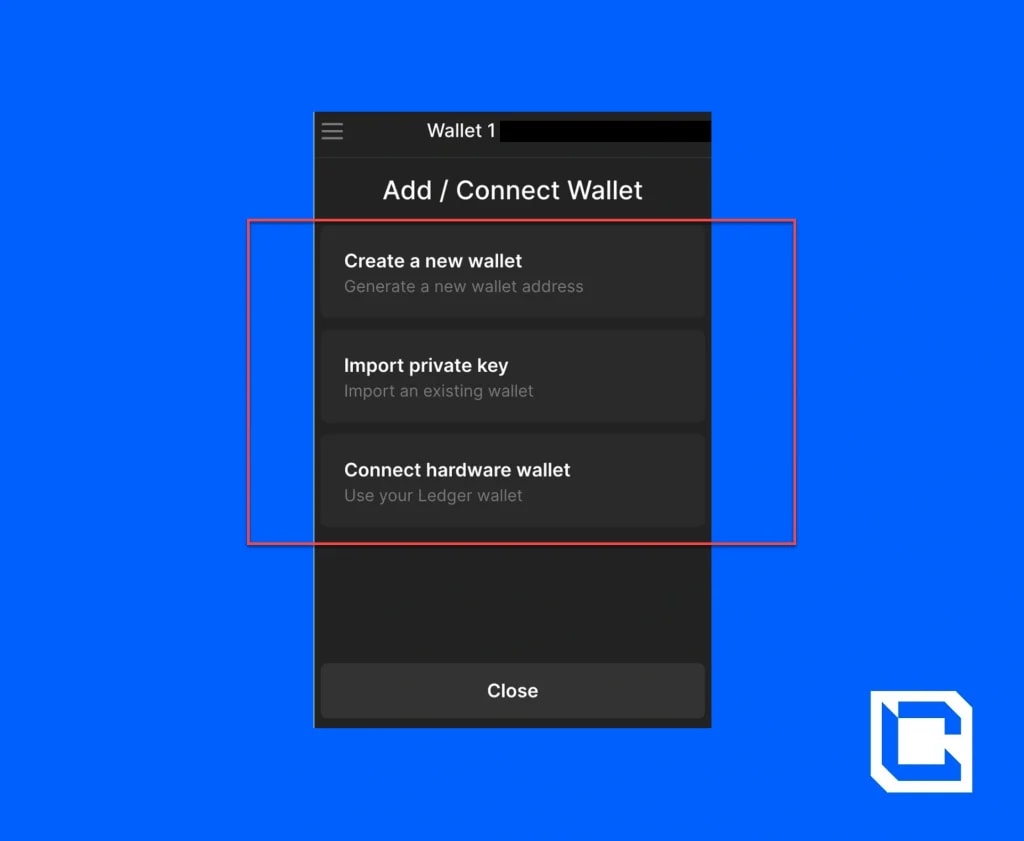
It’s possible to add or connect other wallets to Phantom. To do this, click on the three lines in the top left-hand corner of your wallet’s homescreen. Then press on ‘add/connect wallet’.
You’ll have the option to create a new Phantom wallet, import a separate existing wallet via private key, or connect a hardware wallet. In simple terms, a hardware wallet, or cold wallet, is a device that you can use to store your crypto entirely offline.
To lock your wallet, click on the three lines again and simply click 'lock wallet.’
If you’d like to set an auto-lock timer for your wallet, click on the settings gear icon and then pressing on the ‘auto-lock timer’ tab. Enter how often you would like your wallet to lock and click save.
Depositing tokens
If you have Solana-based tokens in another wallet or an exchange account, you can simply click on your wallet’s name at the top of the screen. Your wallet address will automatically be copied to your clipboard.
All you have to do then is log in to your wallet or exchange account and use this address to deposit the type and amount of whichever Solana-based token you have into your Phantom wallet. We have a whole tutorial on exchange accounts coming soon, so make sure to keep an eye out.
If you don’t have another wallet or an exchange account, then you can click the ‘deposit’ button on your wallet’s homepage. Here, you’ll be presented with two options.
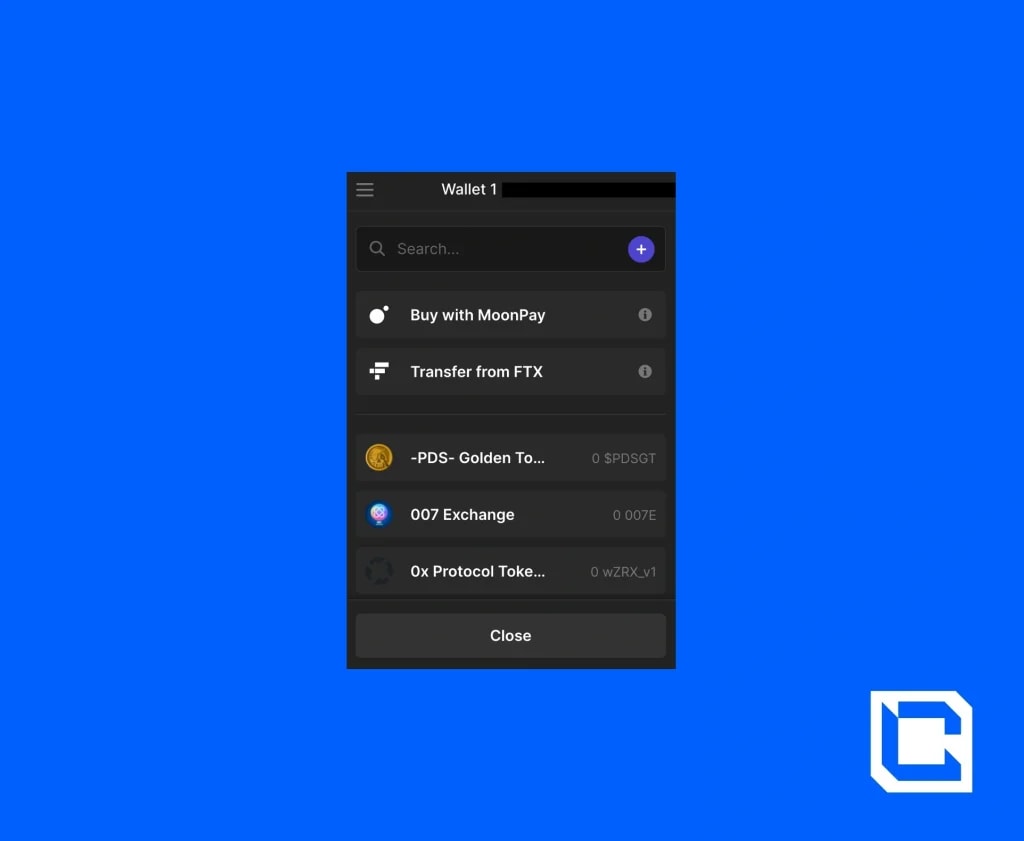
Solana is a high-speed blockchain, so the amount you deposited should appear on your Phantom wallet's homepage within a minute or so.
Add token support
Once you have deposited some tokens, the support for this token will appear on your wallet’s homepage. If you want to manually add support for other tokens, click on ‘manage token list’.
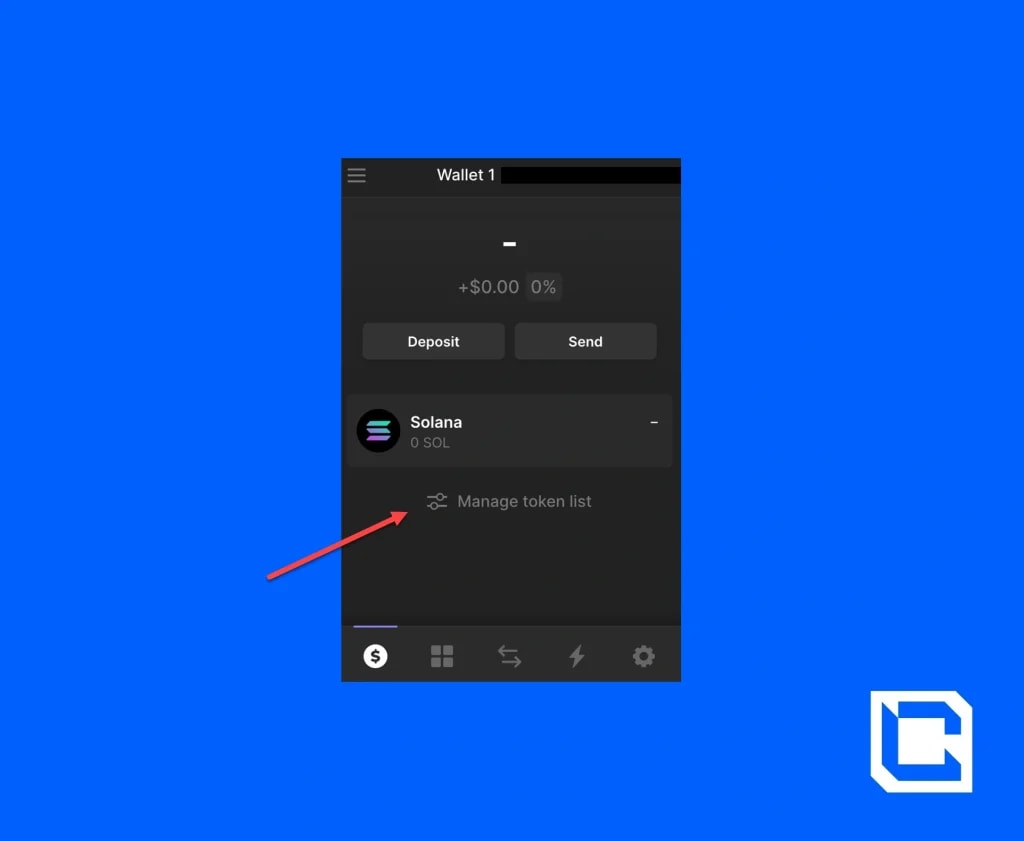
Here, you can type in the name of the token you’re looking for in the search bar. To add this token to your homepage, press on the icon towards the right of the token’s name.
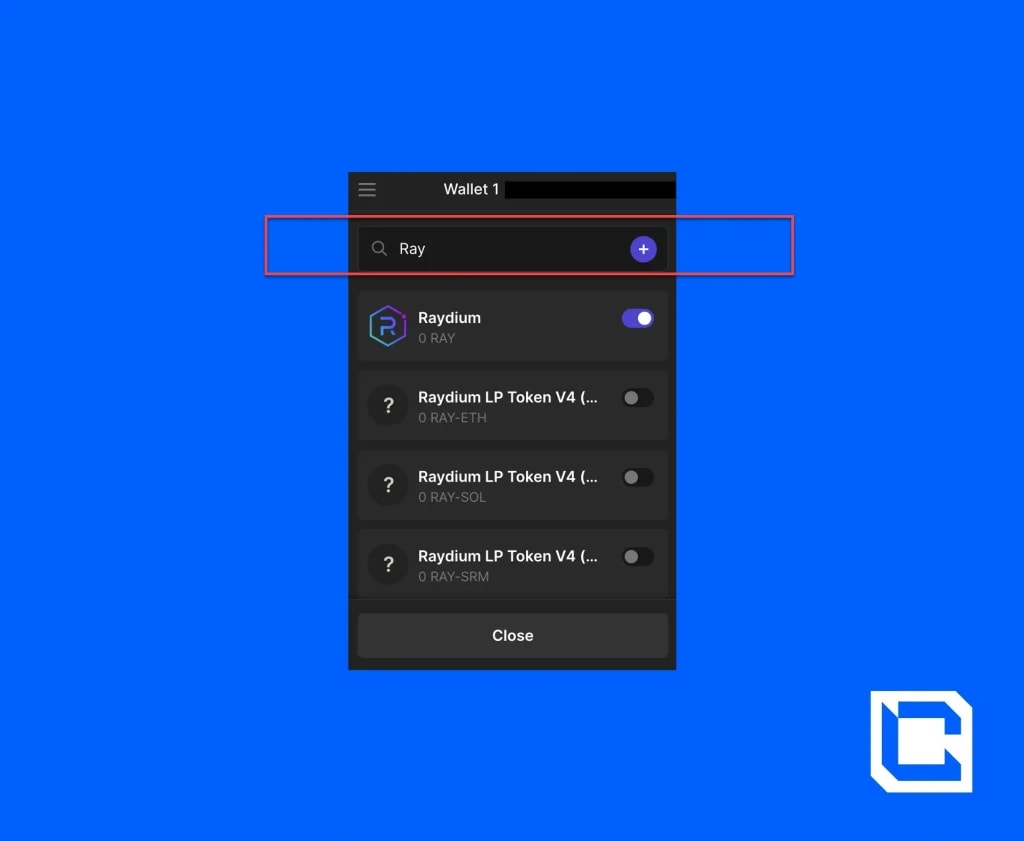
Once you click ‘close,’ the support for this token should now be visible.
Sending tokens
Sending tokens on Phantom is quick and easy. Start by clicking 'send’ on your wallet’s homepage, and then search for or click on the token that you want to send.
Next, you’ll need to enter the recipient’s wallet or exchange address as well as the amount of the token you want to send.
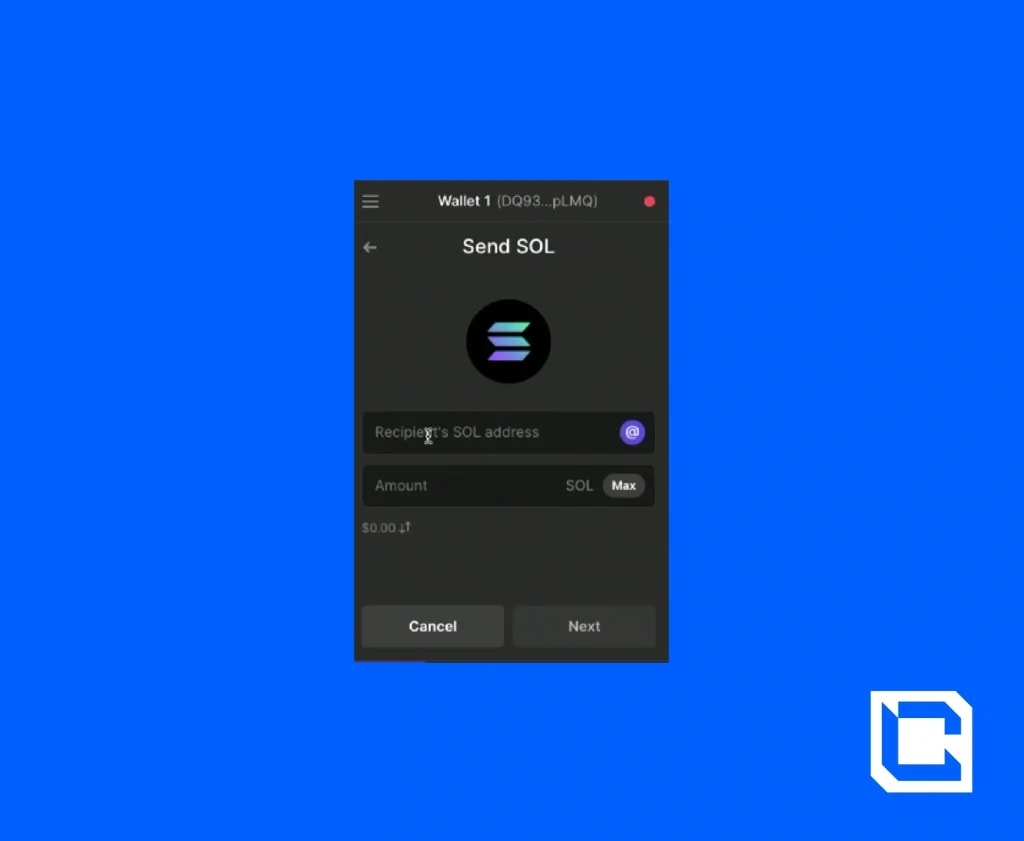
Once you click 'next', you will be required to pay a small blockchain ‘gas’ fee to complete the transaction.
Swapping Tokens
It’s also possible to swap Solana tokens using Phantom’s built-in decentralised exchange.
Start off by clicking on the icon with two arrows at the bottom of your wallet. On the next page, you’ll need to select the type and amount of the token you want to swap, as well as the token you want to swap it into.
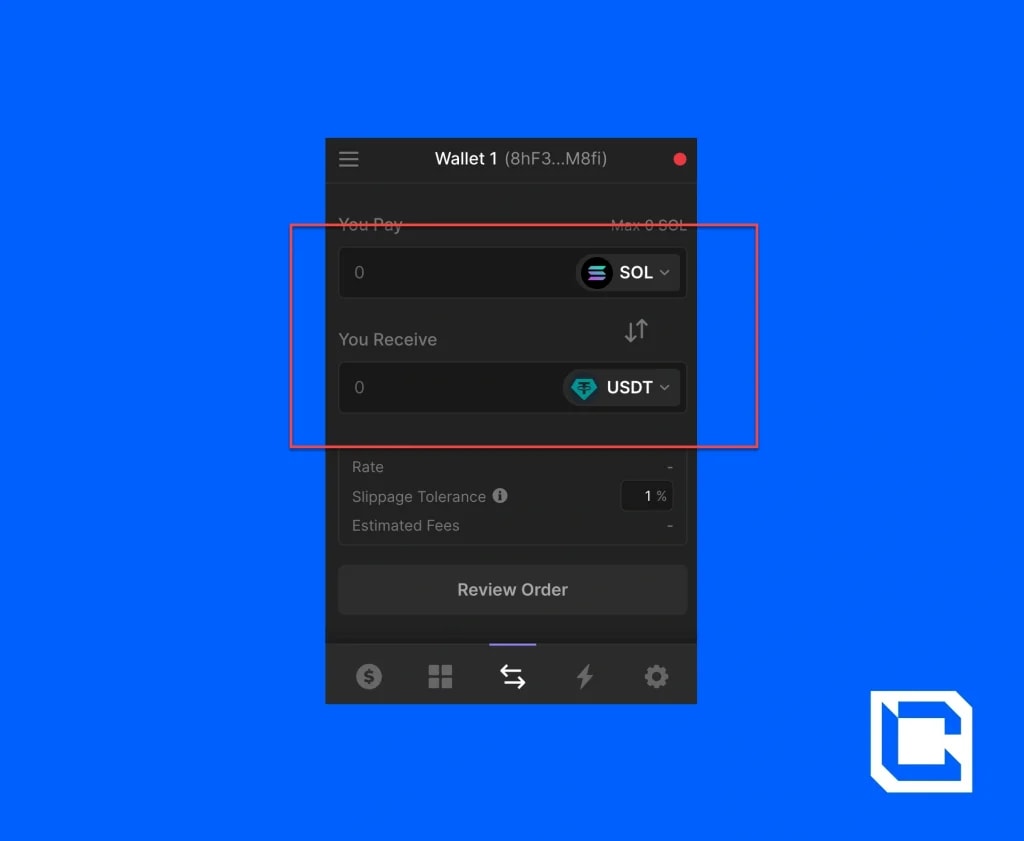
Below this, you have what is known as a ‘slippage tolerance’. Because we are using a decentralised exchange that is influenced by supply and demand, the price of the swap can vary slightly from the time you begin the transaction to the time it is processed. The slippage tolerance is used to represent the level of price fluctuation you are okay with.
As mentioned, Solana is a fast blockchain, so setting a slippage tolerance of 1% is pretty standard. In other words, by setting a 1% slippage rate, you are saying that you are happy to go ahead with the transaction so long as the original exchange rate displayed to you did not alter by more than 1%.
Following this, click 'review order’ to see your order’s details. Here you can see the estimated amount you will be charged for fees, which includes the blockchain gas fee and Phantom’s transaction fee.
Once you click on ‘Swap’, the transaction will be processed.
On the next page, you’ll have the option to ‘view transaction’ which allows you to view your transaction on the Solana blockchain.
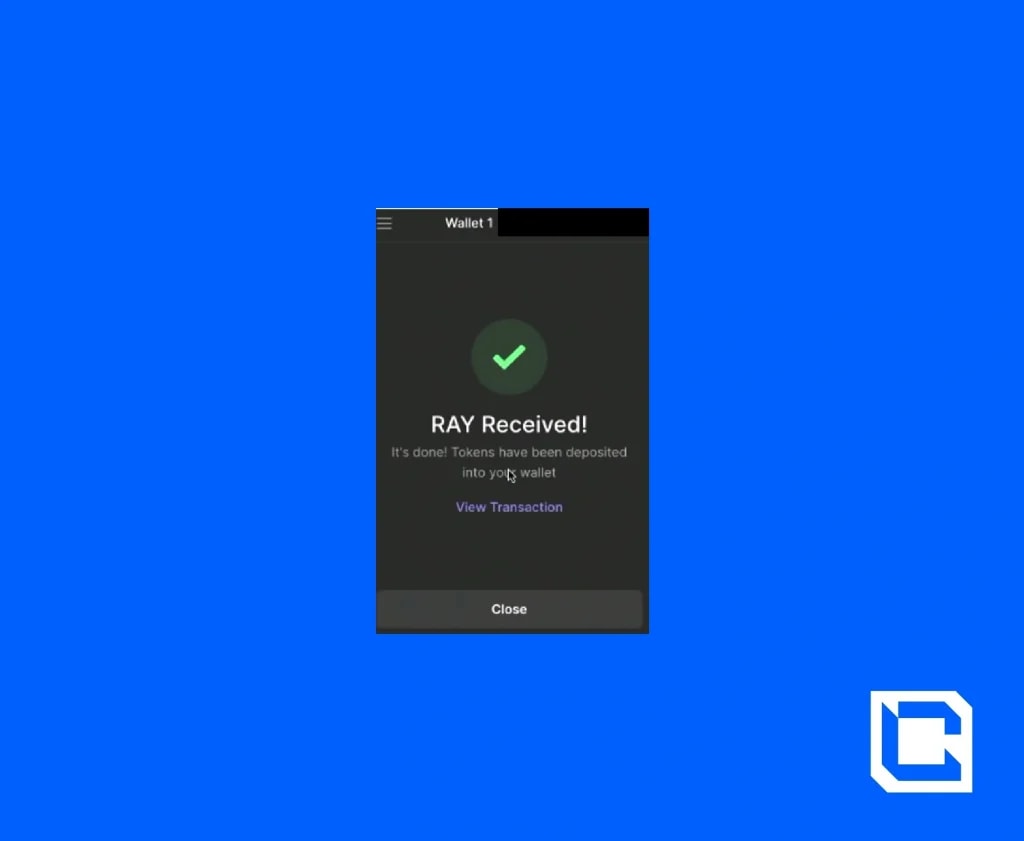
Note: To view your transaction history, press the lightning bolt icon towards the bottom of your wallet’s screen. Whenever you use a dapp via Phantom, it will also be logged here.
Staking tokens
You also have the option to stake your Solana on Phantom. In simple terms, staking is where your crypto becomes part of the process that validates transactions on the blockchain. In exchange for putting your crypto ‘to work’, you can receive staking rewards. You’ll also be helping to reinforce the safety and reliability of the blockchain.
To stake on Phantom, all you have to do is click on the Solana token support on your wallet’s homepage and then click on'start earning SOL’.
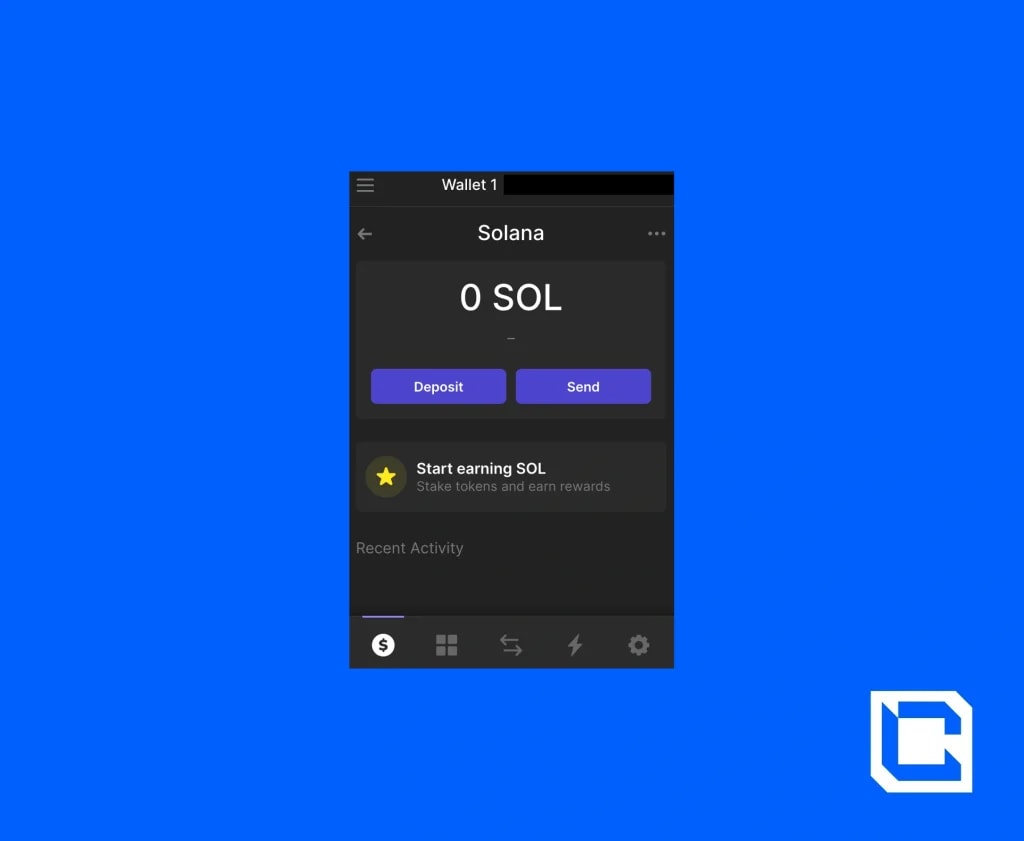
Next, you will need to choose the node or validator you want to stake your Solana to. It’s up to you which one you would like to go for.
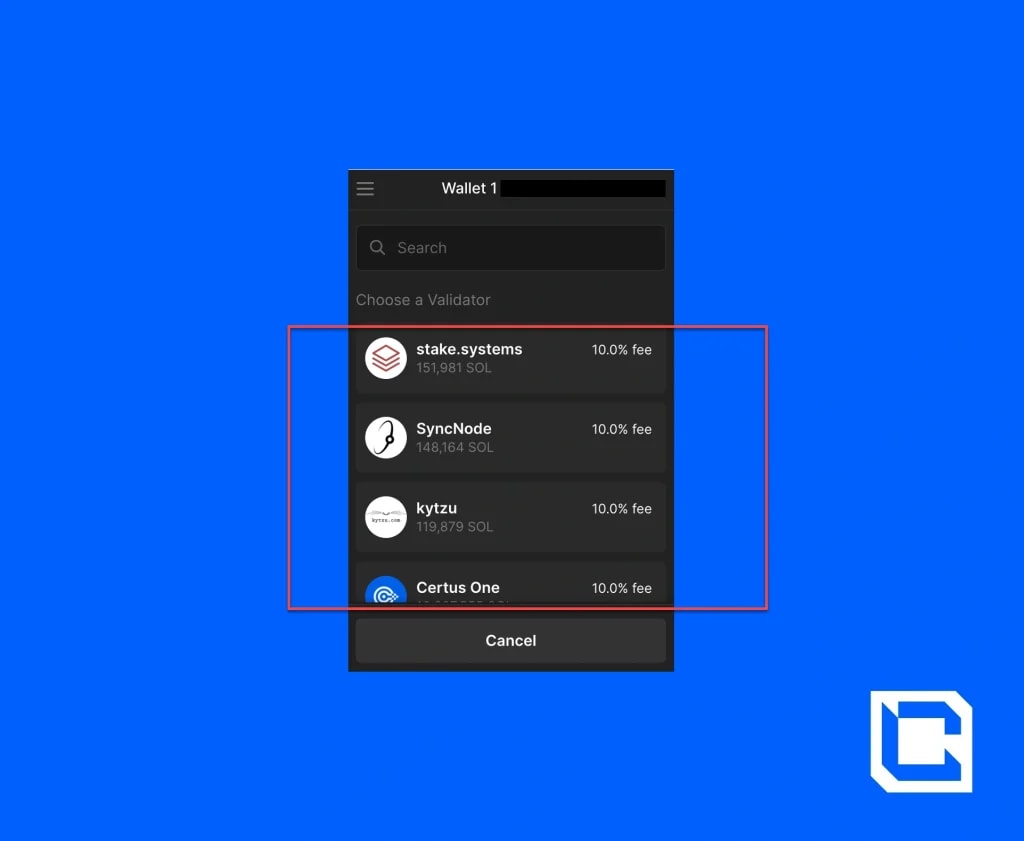
If you already know which node you want to choose, then you can go ahead and type it into the search bar. Otherwise, you can just scroll down through all the different validators. The percent fee that each one of these validators charges as well as the amount of Solana currently staked in them will be displayed.
Once you decide and click on a validator, you’ll have to decide how much of your Solana you want to stake. We don’t recommend staking all of your Solana, as you still need some SOL tokens for anytime you interact with the blockchain (e.g., when using dApps).

By clicking ‘stake’, the transaction will be processed. Your stake should now be visible on your wallet’s homepage!
Connecting to decentralised apps through Phantom
There’s a whole host of dApps that you can use with your Phantom wallet. For this tutorial, we’re going to use the app ‘Raydium’ as an example. Raydium is what is known as an automated market maker that facilitates faster and often cheaper transactions on the Solana blockchain.
To start, head over to Raydium’s website, ‘raydium.io’.Note: Phantom’s mobile app has a built-in browser that makes interacting with Web 3 apps even easier. Here, you can simply type in the name or URL for the dApp/site you want to use (in this case, Raydium) and hit search.

On the Raydium site, click on the ‘launch app’ button followed by ‘connect wallet’.Raydium supports a wide range of crypto wallets, but we will obviously be selecting Phantom. A pop-up screen will appear where you’ll confirm you want to connect your wallet.

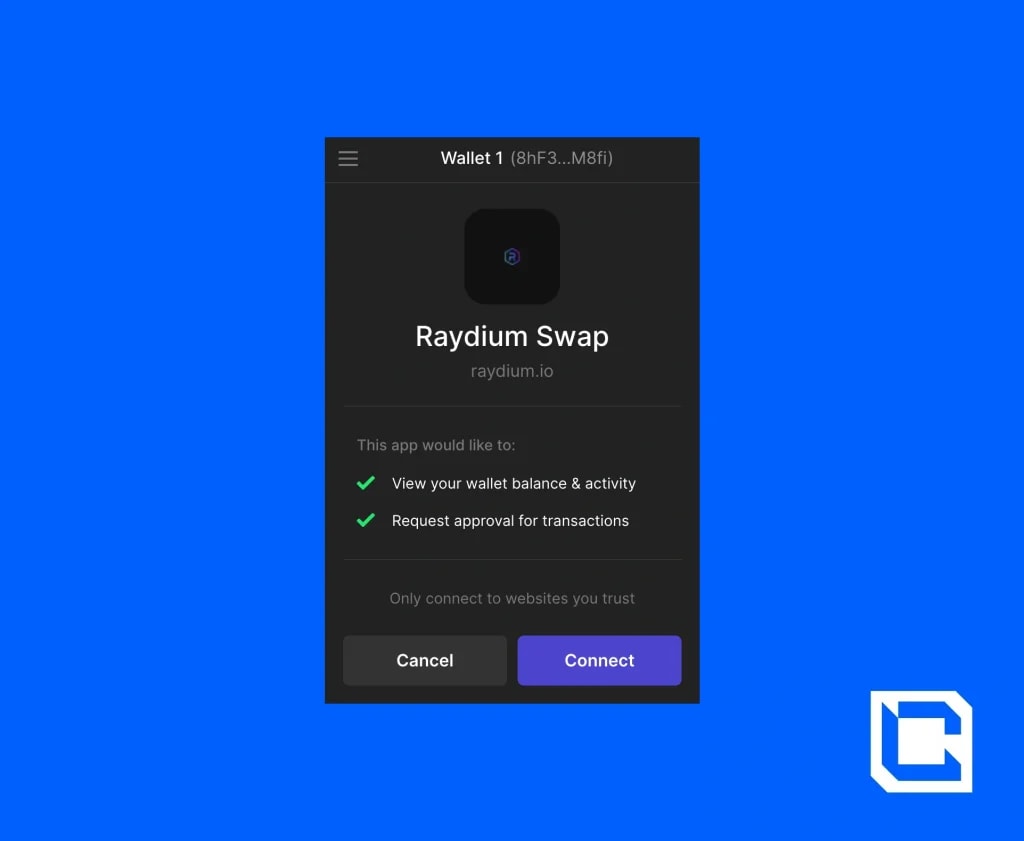
Once you have this done, you’ll be able to use the Raydium app. We will have a whole tutorial on Raydium soon, so keep an eye out!
Want to learn more about how to invest safely? Click here.
FAQs
Here are some FAQs related to using Phantom Wallet.1. How to add USDT to my Phantom Wallet?
To add USDT to your wallet you need to first have an SOL token. After which you can simply swap them with the USDT shown in the “Swapping Token” section above. You can also send USDT directly to a phantom wallet, but you need to make sure that the USDT is on Solana network.2. Does a phantom wallet have gas fees?
Yes, Phantom Wallet does have gas fees, but these fees are tied to the Solana blockchain. Every transaction on Solana, including those made through Phantom Wallet, requires a small amount of SOL (Solana's native cryptocurrency) to cover the gas fees.3. Can you withdraw money from Phantom?
No, you cannot directly withdraw fiat currency from Phantom. However, you can transfer your crypto assets (like SOL or USDT) to a centralised exchange (e.g., Binance or Coinbase) and then withdraw them as fiat.4. How does Phantom wallet work?
Phantom Wallet is a non-custodial, multi-chain crypto wallet that allows users to store, send, receive, and swap digital assets across blockchains like Solana, Ethereum, Polygon, Base, and Bitcoin. 5. Is Phantom Wallet legal in the US?
Yes, Phantom Wallet is legal in the U.S.; however, it operates without formal registration or licensing from major financial regulatory authorities like the SEC or CFTC.
Take Control of Your Crypto Journey 🚀
Mastering Phantom Wallet is just the beginning. The real key to financial freedom? Understanding how to invest and grow your crypto assets. At Cryptonary, we provide expert insights, real-time market updates, and a community of 230,000+ investors navigating the crypto space successfully.🔹 Exclusive crypto research 🔹 Live market updates 🔹 Proven strategies for bull & bear markets
Start your 7-day free trial today—risk-free!
Continue reading by joining Cryptonary Pro
Save 23%
$0
Get everything you need to actively manage your portfolio and stay ahead. Ideal for investors seeking regular guidance and access to tools that help make informed decisions.


For your security, all orders are processed on a secured server.
As a Cryptonary Pro subscriber, you also get:
3X Value Guarantee - If cumulative documented upside does not reach 300% during your 12-month membership, you can request a full refund. Terms
24/7 access to experts with 50+ years’ experience
All of our top token picks for 2025
On hand technical analysis on any token of your choice
Weekly livestreams & ask us anything with the team
Daily insights on Macro, Mechanics, and On-chain
Curated list of top upcoming airdrops (free money)
3X Value Guarantee
If cumulative documented upside does not reach 300% during your 12-month membership, you can request a full refund.

Our track record speaks for itself
With over 2.4M tokens and widespread misinformation in crypto, we cut through the noise and consistently find winning assets.
Our track record speaks for itself
With over 2.4M tokens and widespread misinformation in crypto, we cut
through the noise and consistently find winning assets.


Frequently Asked Questions
Can I trust Cryptonary's calls?
Yes. We've consistently identified winners across multiple cycles. Bitcoin under $1,000, Ethereum under $70, Solana under $10, WIF from $0.003 to $5, PopCat from $0.004 to $2, SPX blasting past $1.70, and our latest pick has already 200X'd since June 2025. Everything is timestamped and public record.
Do I need to be an experienced trader or investor to benefit?
No. When we founded Cryptonary in 2017 the market was new to everyone. We intentionally created content that was easy to understand and actionable. That foundational principle is the crux of Cryptonary. Taking complex ideas and opportunities and presenting them in a way a 10 year old could understand.
What makes Cryptonary different from free crypto content on YouTube or Twitter?
Signal vs noise. We filter out 99.9% of garbage projects, provide data backed analysis, and have a proven track record of finding winners. Not to mention since Cryptonary's inception in 2017 we have never taken investment, sponsorship or partnership. Compare this to pretty much everyone else, no track record, and a long list of partnerships that cloud judgements.
Why is there no trial or refund policy?
We share highly sensitive, time-critical research. Once it's out, it can't be "returned." That's why membership is annual only. Crypto success takes time and commitment. If someone is not willing to invest 12 months into their future, there is no place for them at Cryptonary.
Do I get direct access to the Cryptonary team?
Yes. You will have 24/7 to the team that bought you BTC at $1,000, ETH at $70, and SOL at $10. Through our community chats, live Q&As, and member only channels, you can ask questions and interact directly with the team. Our team has over 50 years of combined experience which you can tap into every single day.
How often is content updated?
Daily. We provide real-time updates, weekly reports, emergency alerts, and live Q&As when the markets move fast. In crypto, the market moves fast, in Cryptonary, we move faster.
How does the 3X Value Guarantee work?
We stand behind the value of our research. If the documented upside from our published research during your 12-month membership does not exceed three times (3X) the annual subscription cost, you can request a full refund. Historical context: In every completed market cycle since 2017, cumulative documented upside has exceeded 10X this threshold.
TermsRecommended from Cryptonary


PRO
Market Direction
13 min read
Mar 10, 2026

PRO
Market Updates
9 min read
Mar 9, 2026
PRO
Market Direction
12 min read
Mar 6, 2026
